Dynamische Buttons - Modals
Diese Funktion ist nur in DCV3 verfügbar.
Mit dieser Funktion kannst du dynamische Modals erstellen, die über Buttons in Discord ausgelöst werden können. Dies ermöglicht es dir, interaktive Formulare zu erstellen, die Benutzer ausfüllen können.
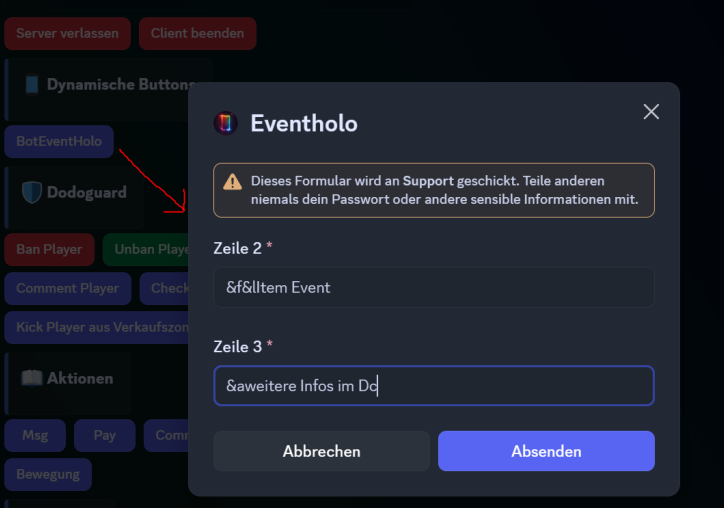
In diesem Beispiel siehst du den Button "BotEventHolo" der das Modal öffnet, hier kann der User in dem Beispiel Holo-Zeile 2 und 3 Angeben. Diese wird dann durch das ModalEvent.json Event weiter verarbeitet.
Aufbau in DynamicButtonEvent.json
- Wichtig
"modalId": "eventholo"muss mit dermodalIdimModalEvent.jsonübereinstimmen, damit das ModalEvent ausgelöst wird. - input1textStyle, input2textStyle, input3textStyle, input4textStyle und input5textStyle können die Werte
shortoderparagraphhaben, je nachdem ob es ein einzeiliges Textfeld oder ein mehrzeiliges Textfeld sein soll. - Alle Felder inklusive Platzhalter etc müssen für jedens Inputfeld befüllt sein.
{
  "dynamicbuttonevents": [
    {
      "systemname": "eventholo",
      "displayname": "BotEventHolo",
      "minimalReqVersion": 1,
      "conditions": [],
      "comment": "",
      "permission": "",
      "dynButtonType": "primary",
      "actions": [
        {
          "actionname": "OpenModalAction",
          "actiondisplayname": "OpenModalAction",
          "minimalReqVersion": 1,
          "data": {
            "modalTitle": "Eventholo",
            "modalId": "eventholo",
            "input1enabled": true,
            "input1label": "Zeile 2",
            "input1placeholder": "-",
            "input1textStyle": "short",
            "input1minlength": 0,
            "input1maxlength": 50,
            "input1required": true,
            "input2enabled": true,
            "input2label": "Zeile 3",
            "input2placeholder": "-",
            "input2textStyle": "short",
            "input2minlength": 0,
            "input2maxlength": 50,
            "input2required": true,
            "input3enabled": false,
            "input3label": "",
            "input3placeholder": "",
            "input3textStyle": "",
            "input3minlength": 0,
            "input3maxlength": 0,
            "input3required": false,
            "input4enabled": false,
            "input4label": "",
            "input4placeholder": "",
            "input4textStyle": "",
            "input4minlength": 0,
            "input4maxlength": 0,
            "input4required": false,
            "input5enabled": false,
            "input5label": "",
            "input5placeholder": "",
            "input5textStyle": "",
            "input5minlength": 0,
            "input5maxlength": 0,
            "input5required": false
          }
        }
      ]
    }
  ]
}
Aufbau ModalEvent.json
Damit das ModalEvent sauber läuft, muss jedes Event, jeweils die ModalReplyActionAction Action beinhalten, damit die Antwort an Discord gesendet wird, andernfalls bleibt der User im Modal hängen und erhält keine Rückmeldung.
{
  "modalevents": [
    {
      "systemname": "eventholoupdate",
      "comment": "eventholoupdate",
      "displayname": "eventholoupdate",
      "minimalReqVersion": 1,
      "conditions": [],
      "actions": [
        {
          "actionname": "ModalReplyActionAction",
          "actiondisplayname": "ModalReplyActionAction",
          "minimalReqVersion": 1,
          "data": {
            "replyMessage": "Holo Update gestartet"
          }
        },
        {
          "actionname": "CommandHoloAction",
          "actiondisplayname": "CommandHoloAction",
          "minimalReqVersion": 1,
          "data": {
            "command": "/pholo edit 300 2 %input1%"
          }
        },
        {
          "actionname": "CommandHoloAction",
          "actiondisplayname": "CommandHoloAction",
          "minimalReqVersion": 1,
          "data": {
            "command": "/pholo edit 300 3 %input2%"
          }
        }
      ],
      "modalId": "eventholo"
    }
  ]
}
Variable Unterstützung
Im ModalEvent kannst du die Zeilen von Modal via %input1%, %input2%, %input3%, %input4% und %input5% ansprechen und in den Aktionen weiterverarbeiten.